The short answer
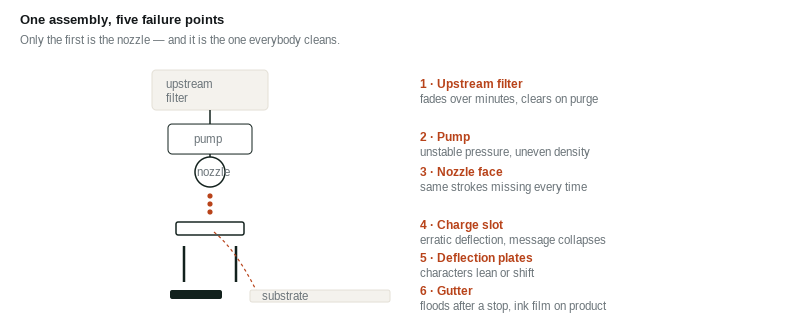
"The head is blocked" is a description of the symptom, not the fault. On a CIJ printhead there are five places where ink can stop behaving: the nozzle, the charge slot, the deflection plates, the gutter, and the filter upstream. Four of the five are not the nozzle, which is why cleaning the nozzle often changes nothing at all.
Five places that produce one symptom
| Place | What happens | What you see |
|---|---|---|
| Nozzle face | Ink dries in the orifice during a stop; a partial film forms | Strokes missing consistently, in the same place every time |
| Charge slot | Ink mist deposits and shorts the charging electrode | Drops do not charge, so they are not deflected — the message collapses toward the gutter |
| Deflection plates | Mist builds on the plates and distorts the field | Characters lean, or the whole message shifts progressively |
| Gutter | Recovery orifice partially blocks; unprinted drops miss it | Ink film on the product, or a head that floods after a stop |
| Filter upstream | Flow falls, pressure becomes unstable | Print fades over minutes, recovers after a purge, fades again |
The third column is the diagnostic. Each place produces a distinguishable pattern, and the pattern is visible on a nozzle test print before anything is dismantled.
Reading the test print
A nozzle test print is a diagnostic instrument, not a maintenance step. Read it before cleaning, because cleaning destroys the evidence.
Same strokes missing every time
Nozzle. The orifice is partially blocked; the missing strokes correspond to blocked jets.
Strokes missing at random
Charge slot or plates. Charging is intermittent, so deflection is erratic.
Whole message compressed toward one side
Charge failure — drops are not deflected at all, so they land near the gutter line.
Print fades along the test strip
Pressure or filter. It is a flow problem, not a nozzle problem.
Ink on the substrate but no visible characters
Gutter not recovering; the head is flooding.
Two minutes with this table usually saves an hour of cleaning. It also prevents the most expensive mistake on a CIJ: repeated nozzle cleaning that never addresses the actual cause, followed by a printhead replacement that was never needed.
Five-minute routine
1
Print the test pattern first
Before touching anything. Photograph it. This is your baseline and your evidence.
2
Purge, then reprint
If it clears and stays clear, the cause was a dry nozzle during a stop. If it clears then fades within ten minutes, stop cleaning and look upstream.
3
Clean the face, not the slot
Wipe the nozzle face along its axis with the approved solvent and a lint-free wipe. Do not poke the orifice. Do not spray solvent into the charge slot.
4
Check the gutter for film
A dry head with a blocked gutter floods on the first start. If the head is wet when it should be dry, this is where to look.
The one habit that prevents most of this
Cover or park the head per the manufacturer's procedure every time the line stops for more than a few minutes — not just at the end of the shift. Most nozzle drying happens in the short stops nobody bothers with, which is why the failure appears at the start of the next run rather than during it.
What not to do yourself
Three operations belong to a service engineer, and attempting them converts a cleaning job into a replacement:
- Removing the printhead. Alignment after refitting is a setup procedure with a test pattern and, on some machines, a calibration routine.
- Cleaning inside the charge slot with a tool. The electrode is small and easily damaged, and a bent electrode produces faults that look like ink problems.
- Adjusting the break-off point. This is a tuning procedure on the ink system, not a maintenance task, and changing it without the right test equipment moves the fault rather than fixing it.
The honest boundary: if a purge plus a face clean does not restore the test pattern, and the ink and filter are known good, call service. Continuing to clean is how a head gets replaced.
Questions we get
How often should I clean the printhead?
Clean the face at every start after a stop long enough for the head to dry, and follow the manufacturer's parking procedure for shorter stops. A fixed daily or weekly figure is less useful than a routine tied to starts.
Can I use any solvent to clean the head?
No. Use the make-up solvent specified for the ink. A different solvent can leave residue, attack seals, or change the ink chemistry left in the head. This is one of the few places where the specified consumable is genuinely required.
Why does the print fade after ten minutes and recover after a purge?
That pattern points upstream: a loading filter or a failing pump, not the nozzle. A purge restores pressure temporarily. Cleaning the head will not change it.
Is a replacement printhead ever the answer?
Yes, when the nozzle face is physically damaged — scoring from repeated wiping, or corrosion from a solvent left in contact. That is visible on inspection. It is not the answer for a head that simply dries out.
Does ink choice affect how often the head clogs?
Yes. Fast-drying inks for non-porous surfaces dry faster everywhere, including in the head. If clogging is frequent and the ink is a fast-dry type, part of the cause is the choice itself.
Next in this thread
The four systems and the triage that separates them.