The short answer
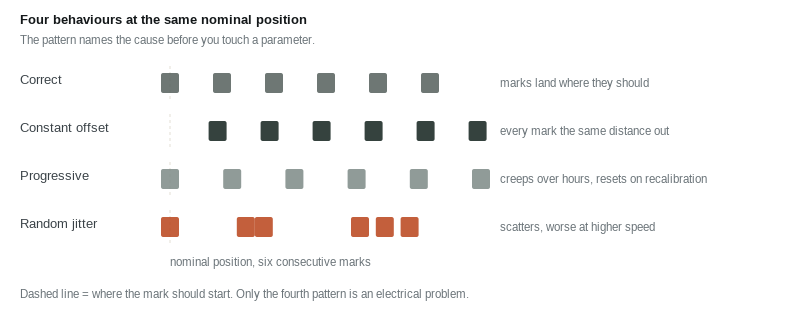
A mark that moves is not automatically an encoder fault. There are three distinct patterns — constant offset, progressive drift, and random jitter — and they have three different causes: installation geometry, wheel wear, and signal integrity. Adjusting the print delay fixes none of them permanently, and it is what most people do first.
This page is about position — where the mark lands on the product. Length accuracy is a different question, covered in why the metre mark drifts. Confusing the two is the most common diagnostic error on a coding line.
Three patterns
| Pattern | What you see | Most likely cause |
|---|---|---|
| Constant offset | Every mark is the same distance from where it should be; changing speed does not change the offset | Printhead position, trigger sensor position, or a delay parameter that was never set for this product |
| Progressive drift | The mark creeps further off over hours or days, and resets when you recalibrate | Measuring wheel wear, capstan slip, or a mounting that is slowly moving |
| Random jitter | Marks scatter around the right place, more at higher speed, sometimes in bursts | Encoder signal integrity — shielding, cable routing, connector, or a failing encoder |
Identify the pattern before touching a parameter. A constant offset has a fixed cause; a drifting one has a wearing cause; a jittering one has an electrical cause. Adjusting delay only hides the second and third temporarily.
What the encoder actually does
An incremental encoder reports movement as pulses. The printer counts pulses and fires when the count matches the target, so the mark lands at a fixed distance rather than a fixed time.
Resolution
Pulses per revolution, divided by the wheel circumference. A 1,000 ppr encoder on a 200 mm wheel gives about 0.63 mm per pulse.
Wheel condition
Effective circumference changes with wear and with compound build-up. A worn wheel under-reports distance.
Contact
The wheel must not slip. Tension, surface contamination and acceleration all affect it.
Signal
A quadrature signal on a shielded cable; noise on that cable becomes position error.
Every one of these can produce a mark in the wrong place, which is why the pattern matters more than the component list.
Isolating the cause
1
Print a static test
Fire the printer on a stopped product, once. If a single static mark lands correctly, the trigger geometry and head position are right — the fault is dynamic.
2
Run the same product at half speed
If the offset stays identical, it is geometric. If it changes with speed, it is delay or slip.
3
Print 20 marks and measure the spread
Identical offset every time = constant. Growing offset across the 20 = drift or slip. Scattered = signal.
4
Wiggle the encoder cable while running
If the mark jumps when the cable moves, it is a connector or shielding fault, not an encoder fault. This takes ten seconds and saves a service call.
Fixing each pattern
| Pattern | Correct action | What not to do |
|---|---|---|
| Constant offset | Set the delay for this product and record it in the product recipe | Leave it as a global setting, then wonder why the next product is wrong |
| Progressive drift | Replace the measuring wheel; check tension and wheel contact | Recalibrate weekly and call it maintenance |
| Random jitter | Re-route and shield the encoder cable; replace connectors; then test the encoder | Increase the print delay to "cover" it — that shifts the error, it does not remove it |
Why recalibrating feels like it works
Because it resets the accumulated error to zero. On a wearing wheel, the drift will return at the same rate — which is why "we recalibrate every Monday" is a symptom of an unreplaced part, not a maintenance routine.
Where the mark position is part of a specification — cable legend placement, for example — put the tolerance and the measurement method in the acceptance criteria rather than relying on a visual check. The wording is in acceptance testing.
Questions we get
Why does the mark move only at high speed?
Two candidates: print delay that is not compensated per speed, or slip that increases with acceleration. Measure the offset at two speeds — if it scales with speed, it is delay; if it varies between runs, it is slip.
How do I know if the encoder is failing?
Jitter is the signature, and it usually appears before total failure. Wiggle test first: moving the cable should not change the mark. If it does, the fault is in the wiring or connector, which is cheaper than the encoder.
Does wheel wear affect position or length?
Both, and that is why the two diagnoses get confused. A smaller effective circumference under-reports distance, so the printer fires late — which looks like a position offset that grows over weeks.
Can I fix a constant offset with the delay parameter?
Yes, and you should — but per product, stored in a recipe. A global delay tuned for one product is a fault waiting for the next one.
Is this different from the metre mark drifting?
Yes. Position is where the mark lands; length accuracy is whether the number printed on it is right. They share components and get confused constantly.
Next in this thread
Where the trigger sits among the four systems.